
Best Job Application Tracker Apps for Tech Professionals
By Patryk Domasik · Created with AI assistance

The best job application tracker for you depends on what you need to organize and which limits you can work with. This comparison covers JobTrackr.it, Huntr, Teal and a Notion database using their documented capabilities and pricing checked on September 8, 2026.
This article is published by JobTrackr.it. It is a documentation-based comparison, not a hands-on performance test or an independent ranking. Prices below are USD where a fixed amount is given. Check the linked vendor pages before subscribing.
Compare the workflows before the feature lists
Use the same small set of opportunities to evaluate a tracker: one saved listing, one submitted application and one role with an interview. Try to record the original advert, current stage and next action without maintaining a second list elsewhere.
| Tool | Capturing and tracking jobs | Follow-ups and notes | Resume tools | Free and paid limits |
|---|---|---|---|---|
| JobTrackr.it | URL extraction, manual entry, browser extension and application stages | Interview stages, notes and reminders | One free analysis; Pro builder, PDF export, matching and tailoring | Free: 10 applications including archived; Pro: $7/month, $17/quarter or $99 once |
| Huntr | Job board and Chrome clipper | Contacts and activities alongside applications | Free base resumes and limited tailored resumes; expanded Pro tools | Free: up to 100 jobs; Pro: $40/month, $90/3 months or $160/6 months |
| Teal | Unlimited free job tracking and Chrome extension | Job-stage email templates and tracking | Unlimited resume creation; limited free AI and expanded Teal+ tools | Teal+: $13/7 days, $29/30 days or $79/90 days |
| Notion | A database you configure; Web Clipper for saving pages | Custom fields, notes and reminders | General document and AI tools rather than a dedicated resume workflow | Personal Free plan available; workspace and AI access depend on plan and billing terms |
Sources: JobTrackr pricing, Huntr pricing, Teal vs. Teal+, Teal pricing, Notion pricing and Notion Web Clipper.
JobTrackr.it: a dedicated application workflow
JobTrackr.it brings capture, statuses, interview stages and reminders together. The free plan includes one resume analysis and one interview quiz. Pro adds unlimited applications, resume building and tailoring, resume matching, an AI assistant, advanced analytics and multi-currency salary comparison.
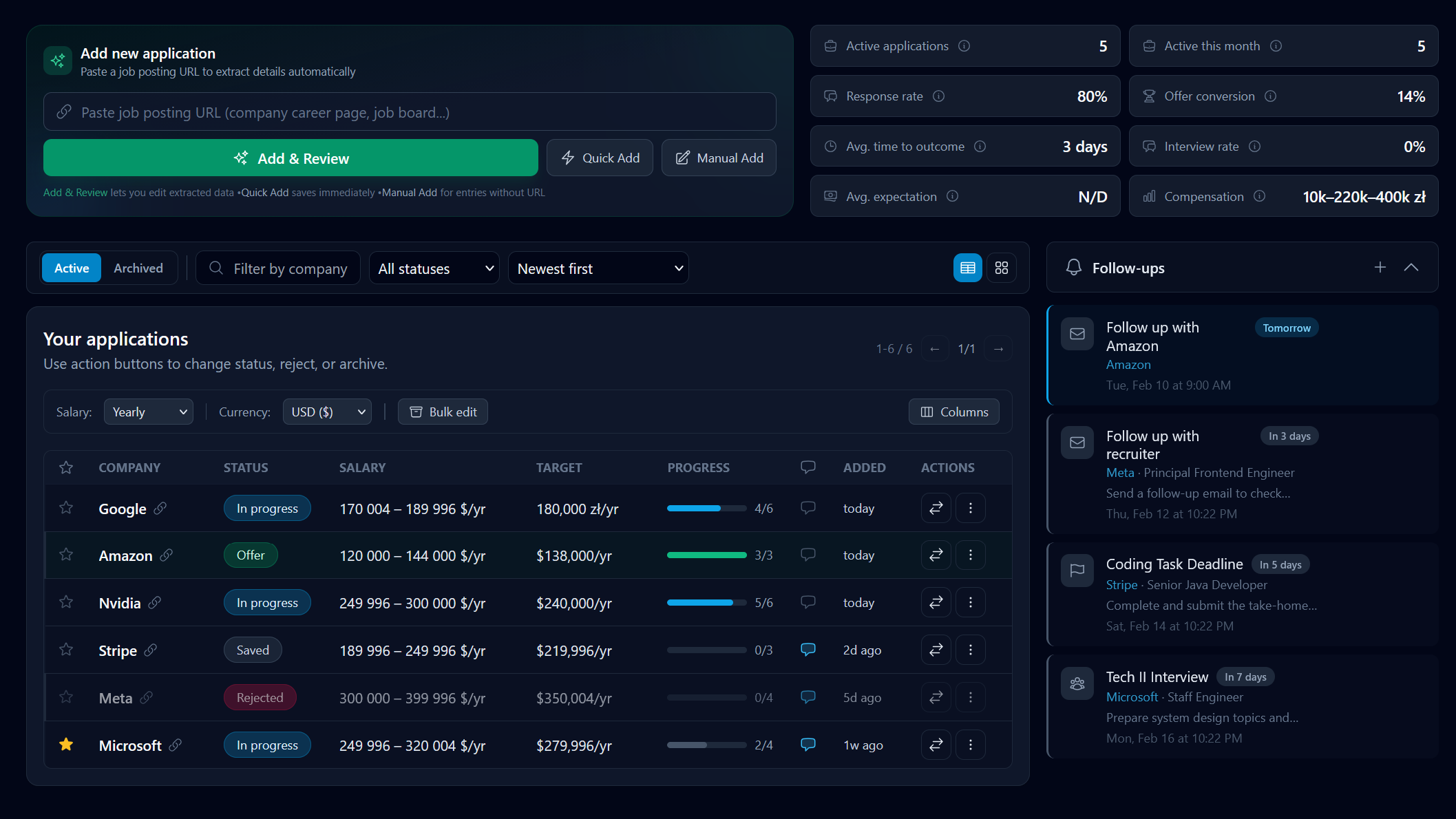
The main free-plan limitation is the number of retained applications. Archived applications count toward the same limit. Consider it when you want the tracking workflow and its Pro tools together; compare the free allowance carefully if you need a large history without a subscription.
Huntr: tracking with resumes and contacts
Huntr's documented free plan combines its job tracker and Chrome clipper with base resumes and contact management. Its larger free application allowance may matter if you want to retain a longer search history. Pro expands job tracking and resume capabilities.
Review the Huntr alternative comparison for the specific differences. Try the job-card and activity workflow before assuming that similar feature names will fit the same habits.
Teal: free tracking and resume creation
Teal documents unlimited job tracking and resume creation on its free plan, plus limited AI generation and interview practice. Teal+ expands those tools. Its resume-first approach may suit you if drafting and revising resumes is central to your process.
Check the renewal period when comparing costs: the listed options are seven, thirty and ninety days. The Teal alternative comparison separates free capabilities from paid access.
Notion: a flexible database you maintain
Notion is worth considering if your search already lives in a workspace with your project notes and documents. You can decide which fields and views to use, but you also maintain the structure and capture workflow. A third-party template may have separate pricing or limitations.
Free and Plus include trial AI access; Business and Enterprise include core AI features, while Custom Agents use separate credits. Do not assume the historical flat AI add-on price still applies. See the Notion tracker comparison for the setup tradeoffs.
A practical selection checklist
- Save a real listing and check whether the role details remain accurate.
- Add a preparation task and find it again from the main view.
- Move an application through the stages you actually use.
- Check what happens to old or archived records and how they affect limits.
- Compare resume tools only if you intend to use them; review AI output before submitting it.
- Read the billing interval, renewal terms and free allowance before moving a large history.
Start with the job-search organization guide if your main problem is deciding what to track. For a busy interview schedule, the interview-tracking workflow may matter more than the longest feature list.
Start tracking your applications for free
Free includes 10 applications, including archived ones, one resume analysis and one interview quiz. See the plan comparison for Pro features.