Mastering Multiple Job Interviews: A Practical Guide for Tech Pros
By Patryk Domasik · Created with AI assistance
Managing several interview processes is easier when every conversation has a stage, a date and a next action. An interview-tracking app can keep those details beside the original job application; a spreadsheet can work too if you maintain it consistently.
Keep one record for each application
A company can have several openings, and one opening can have several interviews. Keep the role and original application as the main record, then add each interview stage beneath it. This prevents notes from two similar roles becoming mixed together.
For each stage, record the date and time zone, meeting format, participants, preparation tasks, questions to ask and the expected next step. Keep the meeting link accessible, but do not place private links in publicly shared examples.
An example interview process
The following is an illustrative workflow. Employers may combine, skip or reorder these stages.
| Stage | Preparation | Notes to capture afterward | Next action |
|---|---|---|---|
| Recruiter conversation | Your priorities, availability and questions about the role | Scope, work arrangement, hiring timeline | Confirm unresolved requirements |
| Technical interview | Relevant projects, technical decisions and tradeoffs | Topics discussed, areas to clarify | Prepare for the next format |
| Team conversation | Collaboration examples and questions about the team's work | Expectations, team structure, working practices | Check the decision timeline |
| Offer discussion | Your priorities and outstanding questions | Written terms and questions requiring confirmation | Review before deciding |
Do not mark an interview complete simply because the scheduled date has passed. Record whether it happened, was postponed or was cancelled.
Set up your interview tracker
- Open the saved application and verify that it refers to the correct role.
- Add the interview stages the employer has actually described. Update them as the process changes.
- Set preparation reminders before each interview, leaving time to gather examples.
- After the interview, add a brief factual note and record any agreed response date.
- Schedule a follow-up only when the timing and employer instructions make it appropriate.
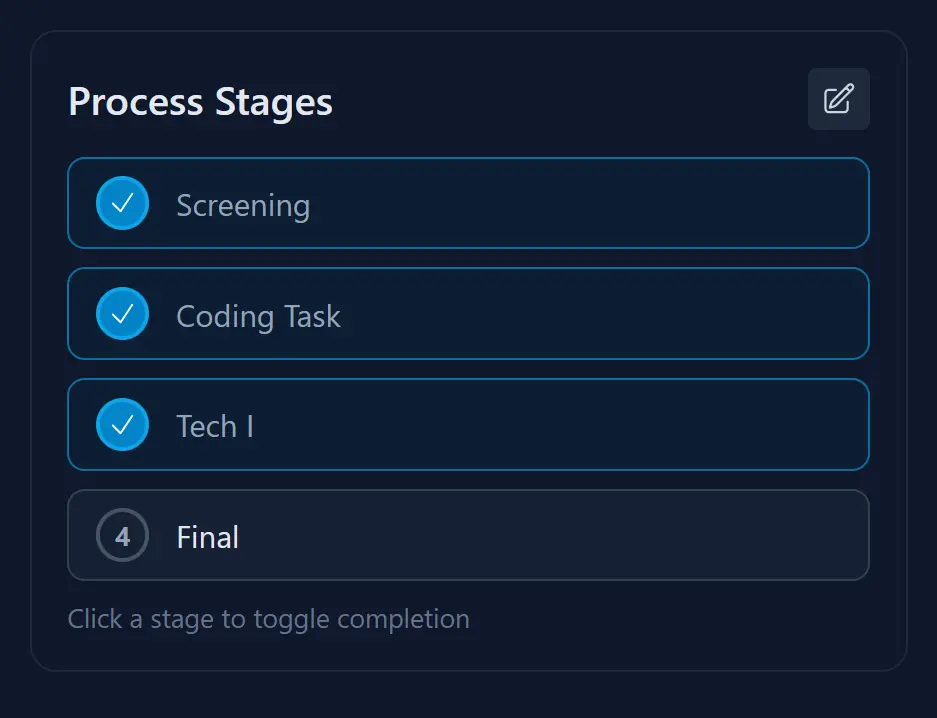
JobTrackr's application records and stages keep this information together. Its follow-up reminders can represent preparation tasks, interviews or a planned email. See the organization guide for the fields to maintain across your whole search.
Prepare examples you can adapt
For a technical role, collect examples that explain the problem, your contribution, the constraints and the outcome. Include work you can discuss openly. For a collaboration question, think through a disagreement, an ambiguous requirement or a decision involving several teams.
Use the job description to decide what to practice. An AI-generated question can be a preparation prompt, but it does not predict what the employer will ask. JobTrackr includes one free interview quiz; unlimited quizzes and the AI assistant require Pro. Keep your own judgment about whether an answer represents your experience accurately.
Write useful notes after each conversation
Separate what the interviewer said from your interpretation. For example, “The manager said the team meets in the office twice a week” is more useful than “Seems flexible.” Record anything you want to confirm in writing.
A short note structure is enough:
- Discussed: the responsibilities and technical topics covered.
- Learned: new information about the team or role.
- Unclear: questions that still affect your decision.
- Agreed next step: who will contact whom and, if supplied, when.
Avoid recording unnecessary personal information about interviewers. Do not treat your notes as permission to record a conversation.
Respond to changed timelines
If an interview moves, update the stage and reminders together. If you hear nothing after the promised date, review the last message before deciding to follow up. The job-ghosting guide includes a concise check-in template.
Continue other processes while waiting for a decision. A tracker should help you notice pending work without turning every silence into an urgent task.
Compare opportunities using the same questions
Review scope, working arrangements, compensation information, development opportunities and unresolved questions for each role. Keep your preferences visible. The purpose is a better-informed decision, not a numerical ranking of incomplete information.
Before choosing software, check whether its free plan covers the number of records you intend to retain. Our tracker comparison explains the differences between JobTrackr.it, Huntr, Teal and a Notion database.
Start tracking your applications for free
Free includes 10 applications, including archived ones, one resume analysis and one interview quiz. See the plan comparison for Pro features.